How to Create Professional Personalized Awards
The awards industry is no longer limited to gold-painted plastic figures on marble bases. Today's customers—ranging from corporate HR departments to local football clubs—crave high-end, bespoke recognition pieces.
With an OMTech CO2 laser cutter, you can transform raw acrylic, wood, and stone into "objects of desire" that recipients will be proud to display for years. Here is your step-by-step blueprint for creating professional-grade awards.
1. Choose Your Material Strategy
The "vibe" of the award starts with the material. Each creates a different perceived value:
- Acrylic (The Glass Lookalike): Clear cast acrylic (6mm to 10mm thick) is the industry standard. When engraved, it turns a frosty white that looks remarkably like etched glass but is far more durable and easier to cut into custom shapes.
- Hardwoods (The Heritage Feel): Oak, Walnut, and Cherry are perfect for "Employee of the Month" plaques or commemorative retirement gifts.
- Slate and Marble (The Premium Weight): Natural stone carries a literal and figurative weight. Engraving stone produces a high-contrast, permanent mark that feels "permanent" and prestigious.
2. Design with Hierarchy in Mind
A great award isn't just a block of text; it's a story. When designing in LightBurn or Adobe Illustrator, follow the rule of thirds:
- The Branding (Top): Place the company or organization logo at the top. Use a high-resolution vector file to ensure the edges are crisp.
- The Achievement (Middle): Use a bold, clean font for the award title (e.g., "Salesperson of the Year").
- The Recipient & Date (Bottom): Use a slightly more elegant or serif font for the individual's name to make it feel personal.
3. Mastering the "Reverse Engrave" Technique
For acrylic awards, professionals almost always reverse engrave.
- How to do it: Mirror your design horizontally in your software. Place your acrylic sheet in the laser and engrave on the back side.
- The Result: When you flip the award over, the engraving is viewed through the thickness of the acrylic. This protects the engraving from dust and scratches while giving the piece a stunning 3D depth.
4. Dialing in Your Settings
To get that perfect "frosty" white on acrylic or the deep "char" on wood, your settings matter:
Material | Mode | Speed | Power | Tip |
Cast Acrylic | Engrave | High | Low-Mid | Use a high DPI (300-500) for a smooth frost. |
Walnut Wood | Engrave | Mid | Mid | Mask with painter's tape to prevent smoke staining. |
Slate | Engrave | High | Mid-High | Wet the slate slightly before engraving for a brighter white. |
5. Adding the Finishing Touches
The difference between a "DIY project" and a "Professional Award" is the finish:
- Edge Polishing: If you are cutting custom shapes out of acrylic, ensure your speed is slow enough to "flame-polish" the edges as it cuts, leaving them crystal clear.
- Color Filling: After engraving wood or acrylic, you can rub acrylic paint or "Rub 'n Buff" wax into the engraved areas to create a gold, silver, or high-contrast black finish.
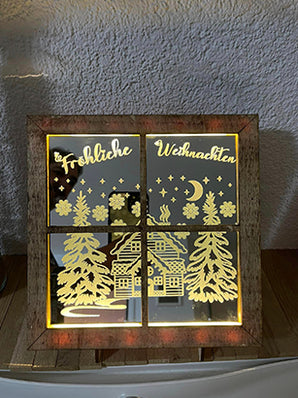
- The Base: Don't overlook the stand. A heavy wooden base or a slotted LED light base can double the retail price of the award.
6. Business Snapshot: The Profit Potential
Personalized awards are a "low material, high labor" product—the perfect recipe for profit.
- Material Cost (Acrylic Blank): £5.00 / A$9.00
- Design & Laser Time (15 mins): £10.00 / A$18.00
- Total Production Cost: ~£15.00 / A$27.00
- Typical Retail Price: £45.00 - £75.00 / A$80.00 - A$130.00
Ready to Start Your Awards Business?
The beauty of the awards niche is the repeat business. Once a company buys their annual trophies from you, they are likely to return every single year.